Browser game project
Wine-Assembly — Windows 98 Games
Open a retro browser desktop with Pinball, Minesweeper, Solitaire and other Windows games.
Wine-Assembly — Windows 98 Games
This game opens on a third-party website. Check its setup instructions for any required game files.
Open game siteThis game opens on a third-party website. Check its setup instructions for any required game files.Open game site
A collection rather than one game
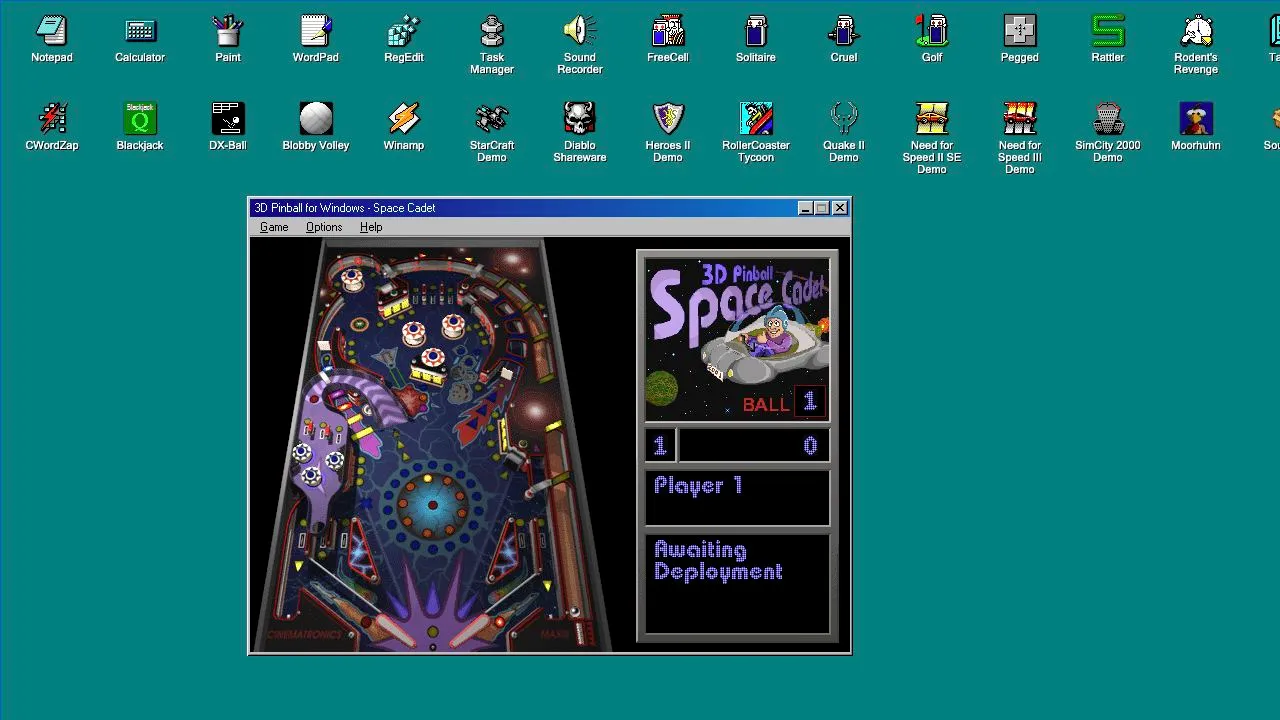
Wine-Assembly opens a Windows-style desktop containing multiple programs. Start with a familiar name such as Space Cadet Pinball, Solitaire, Minesweeper or SkiFree, then explore the developer’s application directory for individual entries.
This listing represents the collection’s shared entrance. Its games can have different controls, resource requirements and compatibility limits. We reached the desktop and opened Pinball; that check does not certify the entire catalogue.
How to open a game
Choose Start game above to load the desktop, dismiss the introductory Read Me window, then double-click a desktop icon. Maximize the player for more room, or use Open original project to open a separate tab. Follow the selected game’s own menus and input prompts. The developer also supplies per-application links in the application directory, which are useful when returning to a particular title.
The screenshot used as this entry’s cover shows the running Pinball window and the surrounding desktop. It is a captured project view, not a replacement image for every game in the collection.
How old Windows games run here
The project executes original program binaries using an x86 interpreter and a Win32 compatibility layer written in WebAssembly Text. It does not boot a full Windows installation, and it is not a collection of separately recompiled game engines.
This is why it carries Emulation and WebAssembly tags rather than a blanket browser-port label. An available executable still needs the APIs and resources the compatibility layer supports; an icon or launch screen alone cannot prove full game compatibility.
Where AI assistance fits
The developer’s project history describes sustained work with Claude Code and Codex on reverse engineering, implementation and tests. That evidence concerns the compatibility platform. It does not make Pinball or the other original Windows games AI-created titles.
Keep each game’s storage and import guidance in view, especially when supplying your own resources. Runtime support and the right to distribute a game’s files are separate questions.