BROWSER PORTS & AI-CREATED GAMES
AI Browser Games
From PC Classics to New AI Creations
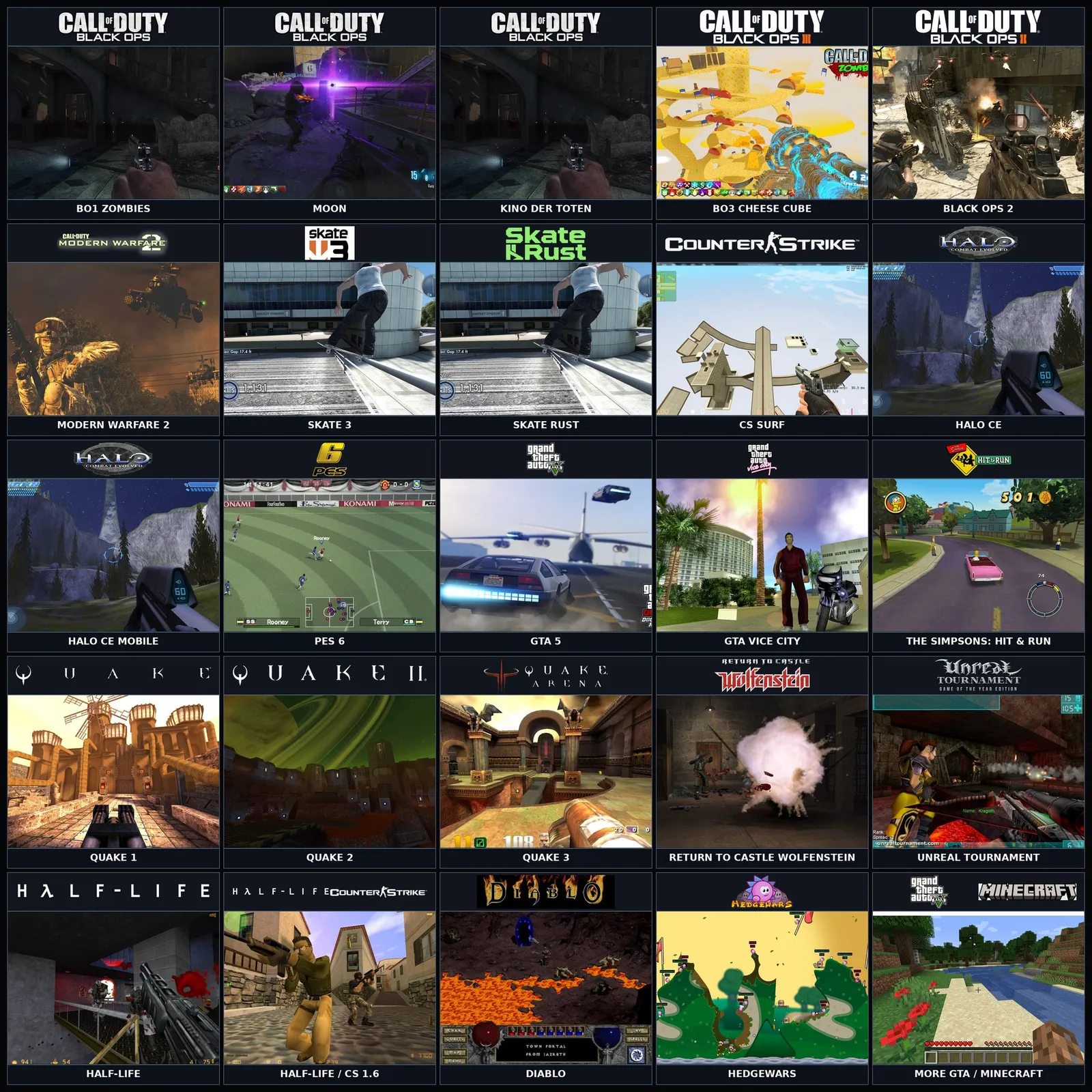
Discover browser versions of familiar PC games, starting with the Radiant Optimizer list. We’re building a home for classic browser ports, AI-assisted projects, and original AI-made games—with clear play links and setup guides.
Looking for Halo, Skate 3 or Black Ops Zombies from the viral post?Explore the Radiant Optimizer browser-game list
Some ports require original game files. Check each game’s setup notes.
Radiant Optimizer Browser Games
Start with Skate 3, Black Ops Zombies, Halo: Combat Evolved, and GTA 5. Check each entry’s project or archive link, version details, and setup notes.
Radiant Optimizer shared the post on October 8, 2026. We assembled the follow-up list using public references and keep its original context alongside each project link. The complete Radiant Optimizer Browser Games page brings the entries together so you can find a specific title without retracing a social-media thread. It also explains known differences between the listing and its destination.
A familiar name does not establish a complete or official browser release. For example, the Skate 3 destination describes a fan project, while the GTA 5 entry is an archive reference. Some titles have multiple versions, so the total counts entries rather than unique franchises. Use the full collection for sources and version details, then open an individual game page for its recorded requirements and link status.
Explore More Browser Games
Keep exploring with Quake, Diablo, The Simpsons: Hit & Run, and CS Surf. Browse the full directory by name or genre, and distinguish game-site links from archived pages.
BROWSER GAME GUIDES
What Are AI Browser Games?
AI browser games usually means games made with AI assistance or AI-generated code that can be accessed through a web browser. The phrase describes both an interest in how games are created and a desire to discover something to play. It does not identify one engine, genre, or level of quality.
AI Browser Games is also the name of this directory. Our current collection includes browser projects whose AI involvement has not been established. We keep that distinction explicit: a game opening in a browser is evidence about its platform, while an AI label needs separate evidence about its development.
Find the Right Browser Game for You
Choose a game by both its genre and its practical requirements. A few checks can save you from opening the wrong version or overlooking a setup step.
Choose a name or genre
Search for a title or browse Action, Sports, Adventure, RPG, and Strategy. Similar names can refer to different projects, so compare entries when several versions are listed.
Read the project notes
Check whether the destination is a game site or an archive. Read its instructions for original game files, browser requirements, keyboard controls, mouse capture, touch input, and saved progress.
Start the browser project
Use the player on the game page, or open the original project site, and follow its setup instructions. Embedded players load only after you choose to start them; compatibility and available modes depend on each project.
AI-Generated Games and Browser Ports Explained
These descriptions answer different questions and can overlap. Understanding them helps you judge a project by what it actually offers rather than assuming that every browser game was generated by AI.
| Description | What it means | What to look for |
|---|---|---|
| AI-generated game | A project described as using AI to generate game code, assets, or other substantial parts of the experience. | A creator’s explanation of what was generated and how the result was developed. |
| AI-assisted development | A developer uses AI tools for tasks such as coding or asset creation within a wider development process. | Specific information about the tools and their role, rather than an unsupported label. |
| Browser port or fan project | An adaptation, engine project, or recreation associated with an existing game; the scope varies by project. | The destination’s version, included content, setup instructions, and any separate AI-development evidence. |
How We Curate AI Browser Games
We preserve source context, distinguish versions, and record known destination differences. A link check describes a network request on a particular date. It does not establish that a game starts, runs smoothly, or works on your phone. Where gameplay or device support has not been verified, the entry says so.
The directory also separates archive references from live project links and leaves AI involvement unestablished when supporting evidence is missing. We are independent of Radiant Optimizer and the linked projects. Our current artwork comes from the original post and serves as reference imagery; browser versions may differ.
AI Browser Games FAQ
Where can I find the Radiant Optimizer Browser Games list?
Open our dedicated collection page for the growing game and version list, the original post, background notes, and known destination differences. The featured cards above are a starting selection. The collection retains the original game entries and can expand as new projects are documented.
Browse the complete listAre all games in the Radiant Optimizer list AI-generated?
Not necessarily. Running in a browser does not establish how a game was made. The collection contains projects with different purposes and development approaches. We record AI involvement only when supporting evidence is available; otherwise, it remains unestablished. The source list itself is not a technical audit.
Can I play Halo or Skate 3 in a browser?
The directory records projects listed under those names, with separate pages for Halo: Combat Evolved, Halo CE Mobile, Skate 3, and Skate Rust. Check the specific destination and version before playing. A listing or successful HTTP response alone does not confirm a complete game or a successful gameplay test.
Compare Halo entriesAre these browser games free and download-free?
Requirements depend on the project. Access through a browser does not guarantee that all content is included, that there are no charges, or that no additional files are needed. Some engine projects ask for original game data. Read the destination’s current requirements rather than treating the collection as a blanket promise.
Can I play these games on my phone?
Mobile support varies. A game may require keyboard input, mouse capture, or browser features unavailable on a particular device. Even a mobile-named version needs checking on your phone. Our entries leave device support unverified unless there is evidence, so a mobile browser opening the page is not a compatibility guarantee.
Do the links still work, and are they safe to open?
Use each entry’s dated link-check information as a starting point. A reachable page is not a gameplay test or a security review, and hosts can change. You are opening a third-party project with its own instructions and privacy practices. The GTA 5 entry leads to an archived page rather than a confirmed live game.
Read the setup guideCan I generate a game with AI on this website?
This release provides game discovery, project links, and explanatory guides. It does not include an AI game generator or a prompt-to-game editor. Creation resources are a possible future direction, while the current focus is helping players understand browser projects and find the entry they came for.
A Little Context Before You Play
Understand browser projects, AI involvement, and the setup steps that vary between games.

AI DECOMPILATION·14 min read
AI Decompiling Games: Tools, Examples & Limits
Real projects. Measurable results. A clear path from compiled code to playable ports.
✳
BROWSER PORTS & AI·3 MIN READ
Browser games, ports & AI: what’s the difference?
A browser is where a game runs. It doesn’t tell you how that game was made.
✳
PLAY & SETUP·3 MIN READ
Before you play: a browser-game checklist
Game files, controls, and saved progress. The things worth checking first.