Browser game project
Budokai T3 — Dragon Ball Z: Budokai Tenkaichi 3
Bring your USA PS2 ISO and launch the Dragon Ball arena fighter in your browser.
DRAGON BALL Z: BUDOKAI TENKAICHI 3
Budokai T3 web online · Your disc, running in your browser
Waiting for your USA ISO (SLUS-21678)…
Where do I download the USA ISO disc?
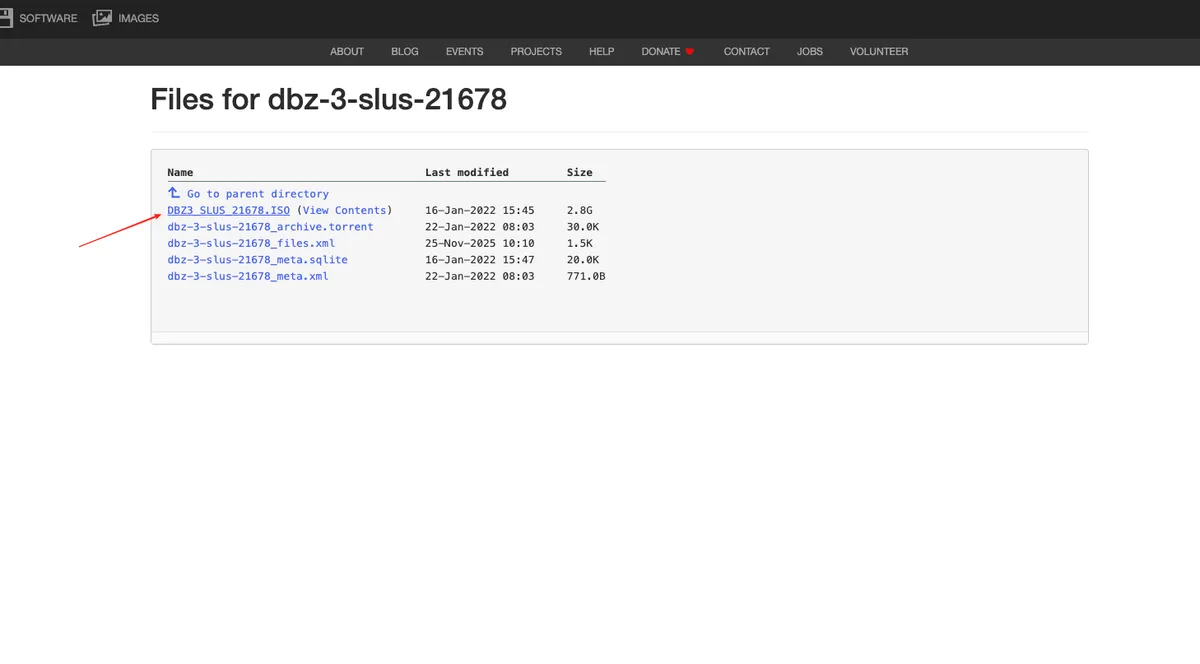
Open the Internet Archive file list and choose DBZ3_SLUS_21678.ISO (2.8G). The required size is 3,020,816,384 bytes.
- Download the
.ISOfile highlighted below. - If your file is in a ZIP or 7z archive, extract the ISO first.
- Return here, then choose or drop the local ISO into this game window.
Your ISO is read locally, never uploaded. Use game data you are authorized to use.
Mouse: left = Start / Confirm · right = Back · wheel = menu
Select or drop your ISO in the game window. Use Maximize or Fullscreen for more room.
Budokai T3 controls & combat mechanics
Learn the Budokai T3 controls before your first fight. Click inside the game window to focus input, then use the table below for movement, combat and menu navigation in Budokai T3 web online.
| Action | Default keyboard | PlayStation gamepad | Xbox controller | Control tips |
|---|---|---|---|---|
| Budokai T3 Movement | W A S D | Left stick / D-pad | Left stick / D-pad | Move around the arena; use directions to select menu items. |
| Budokai T3 Melee Rush | J | □ Square | X | Use for close-range strikes and follow-up attacks. |
| Budokai T3 Guard / Vanish | K | ✕ Cross | A | Guard during combat; Cross also confirms menu choices. |
| Budokai T3 Ki Blast | L | ○ Circle | B | Use for ranged ki attacks; check in-game bindings for charging. |
| Budokai T3 Heavy Smash | I | △ Triangle | Y | Heavy attack input; Triangle also goes back in menus. |
| Budokai T3 Start / Pause | Enter | START / Options | Menu | Start from the title screen or pause the current session. |
| Budokai T3 Confirm | K / left mouse | ✕ Cross | A | First left click starts the title screen; later clicks confirm. |
| Budokai T3 Back | I / right mouse | △ Triangle | Y | Return to the previous menu. Use the wheel to move through choices. |
Mouse shortcuts: left click skips opening logos, starts the title screen and then confirms; right click goes back; middle click sends Start / Pause. Scroll vertically or horizontally to navigate menus. The Confirm, Start / Pause and Back buttons below the game remain available in fullscreen.
Press F1 inside Budokai T3 to inspect settings and customize bindings. Combat actions and advanced combinations depend on the selected control setup and game situation. The PlayStation and Xbox columns show corresponding button positions; check your connected controller’s mapping in the game.
For Budokai T3 touch controls, use the on-screen stick, directional buttons, face buttons and shoulder controls. Portrait and landscape layouts fit different screens. If keyboard input stops after clicking elsewhere, click the game or choose Focus game. Maximize and Fullscreen preserve your Budokai T3 session.
Play Budokai T3 web online with your own ISO
Budokai T3 is a browser port of Dragon Ball Z: Budokai Tenkaichi 3 that reads a supported game disc image from your device. Choose Choose ISO & launch Budokai T3 in the game window above, then select your USA PlayStation 2 ISO. The player stays on this page. Selecting a file reads it locally and does not upload it to our server.
For anyone searching for budokai t3 web online, the important distinction is what happens after launch: the browser loads the Budokai T3 runtime, while your local disc supplies the original resources. This Budokai T3 entry brings the player, file requirements and setup guidance together so you can prepare before opening a large Budokai T3 game image.
What the Budokai T3 browser port does
The original Budokai T3 game is a Dragon Ball arena fighter built around movement, close combat, ranged attacks and character matchups. A Budokai T3 browser session aims to preserve that familiar fighting experience while making the launch process accessible from a web page. Give yourself time to learn the menus and input mappings before expecting a comfortable first battle.
The Budokai T3 runtime comes from the local Budokai browser project and is based on Tenkaichi3Decomp. The upstream repository describes a port of the original game’s code with new rendering, audio and input layers. That is why Budokai T3 can use a purpose-built web runtime rather than requiring a separate general-purpose PS2 emulator installation.
This Budokai T3 player runs inside the game window above. Its local WebAssembly runtime draws the game in that window while this guide stays on the same page. Use the existing Maximize or Fullscreen controls whenever you want more room; returning to the normal view preserves the running session.
Budokai T3 ISO requirements
Before starting Budokai T3, check these details against your own file. Different regions, compressed archives and modified images can fail even when the filename looks correct.
| Requirement | Supported input |
|---|---|
| Game | Dragon Ball Z: Budokai Tenkaichi 3 |
| Platform | PlayStation 2 |
| Region | USA |
| Disc identifier | SLUS-21678 |
| Format | Uncompressed .iso |
| Exact size | 3,020,816,384 bytes, approximately 2.81 GiB |
| File handling | Local browser reads; no disc upload |
The Budokai T3 launcher checks the extension, exact size and ISO 9660 header before downloading the engine. The engine then looks for the USA boot file and required archives. These are compatibility checks, not a full authenticity certificate. A same-size file is not automatically a verified Redump image.
Use game data you are authorized to use. The Budokai T3 page supplies no ISO, ROM, BIOS download or commercial asset package. An open-source engine license does not itself grant permission to redistribute the original game’s data.
Download the Budokai T3 USA ISO and select the correct file
Open the Internet Archive file list linked in the game window’s download help. Look for DBZ3_SLUS_21678.ISO, shown as 2.8G in the listing. Its recorded size is 3,020,816,384 bytes. Choose the ISO entry itself rather than an XML metadata file or a torrent file, then wait for the download to finish.
The expandable help includes a reference screenshot supplied by the site owner, with an arrow identifying the ISO entry. It is a file-selection guide, not a gameplay screenshot. A filename and matching size alone do not authenticate the disc contents. Use data you are authorized to use. Once your Budokai T3 download finishes, return to this same page and select or drop the local file in the game window.
How to play Budokai T3 in your browser
- Prepare the supported ISO on the device you intend to use. Extract a compressed archive before selecting it.
- Choose Choose ISO & launch Budokai T3 in the game window. There is no separate play page to open.
- Select your
.iso, or drag it into the game window. Canceling the file picker leaves the player ready for another selection. - Let the browser load the Budokai T3 engine and index the disc. Initial setup can take time, especially on a slower device.
- Click or tap the game area to focus input and unlock browser audio. Use the menu to choose a mode, then check your controls.
The Budokai T3 launch process reads portions of the ISO as they are needed. It does not transfer the entire multi-gigabyte disc to our hosting service. Keep the file available for the session: refreshing or reopening the player means selecting it again.
Browser performance and Budokai T3 loading problems
Budokai T3 requires WebAssembly and WebGL2. Try a current desktop Chrome or Edge browser with hardware acceleration enabled as an initial setup. The player chooses a JSPI build when the browser exposes that feature and an Asyncify build otherwise. A Try compatibility build link lets you request the latter explicitly.
If Budokai T3 rejects your file immediately, compare its byte size and region with the table above. Renaming a ZIP or another region’s disc to .iso does not convert it. If the engine download fails, choose your ISO again to retry in the same window. If the picture stays black after indexing, try the compatibility build and inspect any displayed error before repeating the same steps.
Do not interpret a Budokai T3 loading screen or a frame-rate counter as a guarantee of stable play. Browser version, available RAM, graphics drivers and the selected game scene all affect the result. We checked the integration and engine initialization; we have not independently completed a fight with an original disc in this player.
Budokai T3 saves, backups and privacy
Budokai T3 saves and settings use device-local browser storage. Returning in the same browser can preserve progress, but private browsing, storage cleanup and browser resets can remove it. Changing browsers or devices creates a separate storage environment. A save on the original project website also belongs to that website’s storage and will not appear here automatically.
Once Budokai T3 starts, use Export saves in the player toolbar to download a backup. Import saves accepts that backup format and asks before overwriting matching files. After importing, the game restarts in the same window with your selected ISO to read the restored progress. Export first when moving between devices or clearing site data.
The local Budokai T3 disc reader has no ISO upload endpoint. Normal requests still deliver the runtime files; local file selection does not make the whole website an offline application. This distinction explains how a browser game can use your own disc without sending the disc itself across the network.
What Budokai T3 online includes here
Budokai T3 online describes browser access on this page. It does not promise internet matchmaking, room codes or a deployed multiplayer relay. Upstream experiments and features in another build are not automatically features of this integration. Check the browser build documentation for that project’s separate scope.
Ready to try Budokai T3? Confirm the USA ISO requirements, launch the player and test input before a longer Budokai T3 session. For other projects with their own file requirements, explore our browser game library or read the before-you-play guide.
Frequently asked questions
Can I play Budokai T3 web online without downloading an emulator?
The integrated Budokai T3 player runs a WebAssembly port inside your browser. You do not install a separate emulator, but you must provide the supported USA PS2 ISO. Your browser still downloads the runtime code.
Which ISO does Budokai T3 need?
Use Dragon Ball Z: Budokai Tenkaichi 3 for PlayStation 2, USA release SLUS-21678, as an uncompressed .iso of exactly 3,020,816,384 bytes. Matching size alone does not prove that a file is an authentic or unmodified copy.
Does the Budokai T3 player upload my ISO?
No. The selected File is read locally in slices. This Budokai T3 player has no ISO upload endpoint and does not send the disc to a server. The site still delivers the JavaScript and WebAssembly runtime over the network.
Can I use a controller or play Budokai T3 on mobile?
The runtime includes gamepad input and touch controls for portrait and landscape. Budokai T3 support depends on the device, browser and controller. Desktop Chrome or Edge is a sensible starting point; mobile performance has not been independently verified here.
Where are my Budokai T3 saves stored?
Saves stay in this browser through IndexedDB. Export a save backup from the player before clearing site data or switching devices. Reloading this page requires selecting your ISO again; progress does not automatically sync across browsers.
Does Budokai T3 online mean internet multiplayer?
On this page, online means running in a web browser. This integration does not include matchmaking or a room server. Do not assume that upstream experimental netplay is available in this player.